1.消息队列
- 作用:程序解耦 异步处理 消峰
- 常用队列:kafka/nsq
2.nsq特点
- 分布式部署 非集群并没有解决nsqld节点的单点故障 lookupd也非集群而是相互完整独立的个体
- 推的方式 处理消息
- 主要在内存 超出内存配置后落地磁盘
- 消费者通过nsqlookupd发现nsq节点
- TLS保证数据安全
- 支持tcp/http协议 发送消息到队列
- 提供后台管理nsqadmin
3.nsq架构
⬑ nsq架构
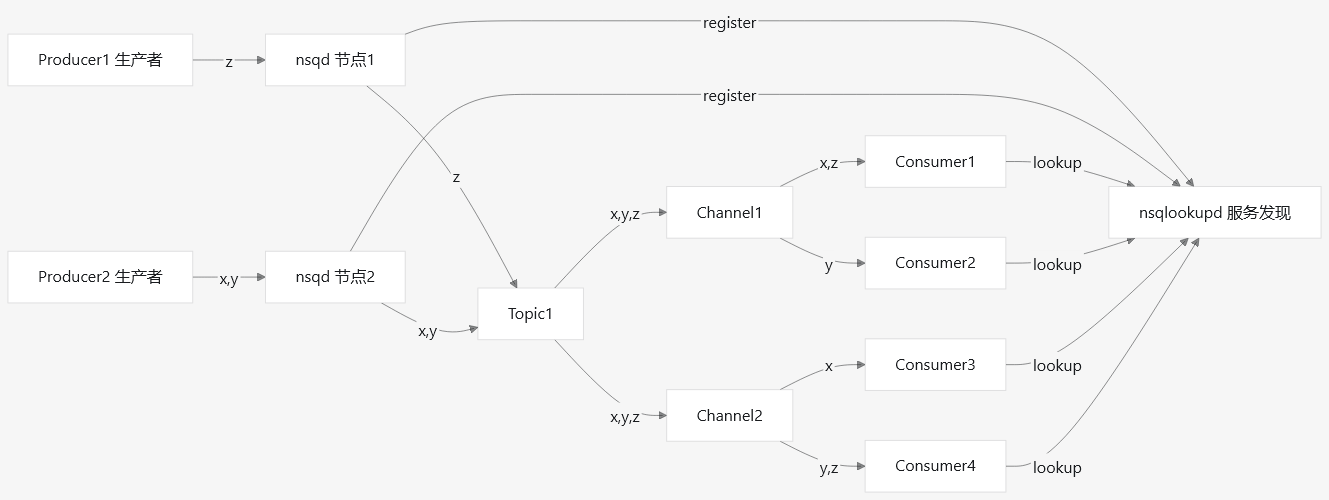
- 组件
nsqd:用于消息接收、分发、传递 prot: 4150:tcp的生产者 4151:http的生产者
nsqlookupd:用于消费者发现nsqd节点 prot: 4160:tcp 4161:http
nsqadmin:后台web页面 prot:4171 - 消息流
生产者2的 xy消息 可以被 topic1 发给多个channel,但是channel1中的 x 只能被一个 consumer 消费 - lookupd
nsqd向lookupd注册 消费者通过lookupd发现新增的nsqd,lookupd的只在消费者发现nsqd阶段起作用,后续的生产者消费者建立连接以后 的 消费过程就不再依赖于lookupd了
比如nsqd1是新增的节点,如果这个时候lookupd都挂了 消费者发现不了nsqd1 那么图中z消息 就不会被消费者消费。如果nsqd2为旧节点,那么图中xy消息仍会被消费者消费
lookupd可以拉多个,但不是集群也不是分布式 而相互完整独立的个体 nsqd向每一个lookupd注册 业务层:消费者只要在其中一个lookupd获取到nsqd的信息就可以了,获取失败就去lookupd2获取.. - nsqld
nsqd节点属于分布式部署 非集群并没有解决单点故障 比如nsqd1挂了 那么生产者1绑定了nsqd1 那么生产者1的消息就发不出去
topic channel都是在nsqd节点的内存,一个topic可能在多个节点都有内存 - 伪代码
producer1, err := nsq.NewProducer(addr.nsqd1, nsq.NewConfig())        //生产者创建时绑定nsqd地址
producer2, err := nsq.NewProducer(addr.nsqd2, nsq.NewConfig())
consumer1, err := nsq.NewConsumer(topic1, channel1, nsq.NewConfig())  //在创建消费者时 会让topic知道自己下面有多少个channel
consumer2, err := nsq.NewConsumer(topic1, channel1, nsq.NewConfig())
consumer3, err := nsq.NewConsumer(topic1, channel2, nsq.NewConfig())
consumer4, err := nsq.NewConsumer(topic1, channel2, nsq.NewConfig())
consumer*.AddHandler(handler)                                         //消费者绑定消息处理子类对象 确定收到消息后的处理
err = consumer*.ConnectToNSQLookupd(addr.lookupd)                     //消费者绑定lookupd地址 用于发现nsqd
4.nsq工具
- nsq_stat 实时获取指定topic,channel下统计信息
- nsq_to_file 将指定topic,channel中的消息导出到文件
- nsq_to_http 将指定topic,channel中的消息转发到http服务器
- nsq_to_nsq 将指定topic,channel中的消息转发到其他nsqd服务
- to_nsq 将控制台消息发送到指定topic
- nsq_tail 将指定topic,channel中的消息打印到控制台
5.部署
绿色安装
https://github.com/nsqio/nsq/releases/tag/v1.2.0
https://github.com/nsqio/nsq/releases/download/v1.2.0/nsq-1.2.0.linux-amd64.go1.12.9.tar.gz
cd /data/apk
rz

sudo tar -zxvf /data/apk/nsq-1.2.0.linux-amd64.go1.12.9.tar.gz -C /data/svr
cd /data/svr/nsq-1.2.0.linux-amd64.go1.12.9
sudo mkdir data
开机启动配置
sudo vim /etc/systemd/system/nsq_to_file.service    #日志打印推nsq,nsq_to_file消费落地文件 (优势:不占用逻辑服的io 统一打印)
[Unit]
Description=nsq_to_file
After=nsqlookupd.service

[Service]
Type=simple
ExecStart=/data/svr/nsq-1.2.0.linux-amd64.go1.12.9/bin/nsq_to_file -topic-pattern=[a-z]*_plog -datetime-format=%%Y-%%m-%%d --rotate-size=20000000 -filename-format=<TOPIC><REV>.<DATETIME>.log --output-dir=/data/logs/phgames/plog -lookupd-http-address=127.0.0.1:4161 -log-level=fatal
User=root
Group=root

ExecStop=/bin/kill -s TERM $MAINPID

[Install]
WantedBy=multi-user.target
sudo vim /etc/systemd/system/nsqadmin.service #后台 [Unit] Description=nsqadmin After=nsqlookupd.service [Service] Type=simple ExecStart=/data/svr/nsq-1.2.0.linux-amd64.go1.12.9/bin/nsqadmin --http-address=0.0.0.0:4171 -lookupd-http-address=127.0.0.1:4161 -log-level=error User=root Group=root ExecStop=/bin/kill -s TERM $MAINPID [Install] WantedBy=multi-user.targetsudo vim /etc/systemd/system/nsqd.service #nsqd [Unit] Description=nsqd After=nsqlookupd.service [Service] Type=simple ExecStart=/data/svr/nsq-1.2.0.linux-amd64.go1.12.9/bin/nsqd --tcp-address=0.0.0.0:4150 --http-address=0.0.0.0:4151 -lookupd-tcp-address=127.0.0.1:4160 -broadcast-address=192.168.10.235 -log-level=error User=root Group=root ExecStop=/bin/kill -s TERM $MAINPID WorkingDirectory=/data/svr/nsq-1.2.0.linux-amd64.go1.12.9/data [Install] WantedBy=multi-user.targetsudo vim /etc/systemd/system/nsqlookupd.service #nsqd服务发现 [Unit] Description=nsqlookupd After=network.target [Service] Type=simple ExecStart=/data/svr/nsq-1.2.0.linux-amd64.go1.12.9/bin/nsqlookupd --tcp-address=0.0.0.0:4160 --http-address=0.0.0.0:4161 -broadcast-address=192.168.10.235 -log-level=error User=root Group=root ExecStop=/bin/kill -s TERM $MAINPID [Install] WantedBy=multi-user.target设置开机启动
sudo systemctl daemon-reload
sudo systemctl enable nsqadmin nsqd nsqlookupd nsq_to_file
sudo systemctl start nsqadmin nsqd nsqlookupd nsq_to_file
6.测试
cd /data/svr/nsq-1.2.0.linux-amd64.go1.12.9/bin
./to_nsq --nsqd-tcp-address="127.0.0.1:4150" --topic=topicA                           #生产者 tcp终端

curl -XPOST "http://127.0.0.1:4151/pub?topic=topicA" -d "11"                          #生产者 http

cd /data/svr/nsq-1.2.0.linux-amd64.go1.12.9/bin
./nsq_tail --lookupd-http-address="127.0.0.1:4161" --topic topicA --channel channelA  #消费者 把消息打印到终端
7.命令
cd /data/svr/nsq-1.2.0.linux-amd64.go1.12.9/bin
./nsq_stat --lookupd-http-address=127.0.0.1:4161 --topic=topicA --channel=channelA     #查看topic&channel状态
---------rate(速率)--------+-----------------depth(积压)------------------+----------------------metadata--------------------
ingress(生产) egress(消费) | total mem(内存) disk(磁盘) inflt(处理ing) def | req(重试次数) t-o(超时次数) msgs(历史总数) clients(当前cli连接数)
      0       0           | 0     0         0          0              0  | 0             0            0             1
文档更新时间: 2026-09-17 11:00 作者:morninglu